
This is Derek Powazek Fray Magazineer
This is Powazek
Castro Flower ShopTiredHappy breakfastUpPupSmog Queen LoungeCold Drinks
<begging> Prove your love. Subscribe to Fray! </begging>

Wanted: Apple Mail Mini Player

One of my favorite parts of Apple’s iTunes software is the “Mini Player” view. Just click the green “+” gumdrop and poof - all of the bulk is gone and the app is condensed down to its raw essentials.
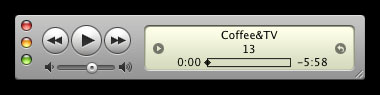
itunes mini

Note: I’m skipping the rant about how the green “+” gumdrop does something different in iTunes than any other app. The mini/maxi toggle should have been another button entirely, but that ship has clearly sailed.

This Mini Player view is notable because iTunes is the only iApp that has such a state. Ostensibly this is because you may need quick access to your music controls when in other apps. But I think some other apps could use a mini state. Specifically, Apple’s Mail.

Apple’s Mail app is probably the single most-used application I have. And it’s bulky. The mailboxes pane takes up a quarter of the screen, and the split message list and message viewer slices up screen real estate into ever-smaller bits.

But most of the time, my needs are simple. I want to see if there are any new messages. Maybe manually tell it to check for new mail. Maybe start a new message. That’s about it.

All of these tasks could be completed from a “Mini Player” state. Imagine it looks something like this.
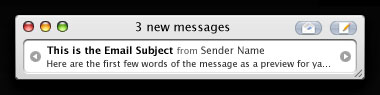
email mini

There it all is: I can start a new message, check mail, and glance at the recent messages, all in a tiny window that I could position to be ever-present at the bottom of my screen. Am I the only one who wants this?

17 Comments

Have you checked out Growl? It pops up a little notification window everytime a new piece of mail arrives which is also clickable to take you straight to mail if you require. You can also configure how long the window stays on the screen, how big it is, colour etc.

nigel on 8 May 2007 @ 12am

Nice idea but a combination of Quicksilver and Gmail Notifier does the same job for me. Or maybe you can find a Dashboard widget and use some fooshmoo hacks to put in on your desktop?

Tomek on 8 May 2007 @ 5am

A Mail Mini Player would be great–good idea, Derek!

At the moment, I mostly keep Mail hidden and use a combination of Growl notifications and Quicksilver shortcuts for quick reading/writing, but that’s far from ideal. For one thing, mailing lists with a lot of messages tend to gum up Growl pretty good…

Jacob Patton on 8 May 2007 @ 7am

Great idea! Configuring multiple tools such as quicksilver and growl is always more complicated, and growl, though fine in itself, hardly has the elegance of what you’re proposing.

James on 8 May 2007 @ 8am

What about Mail.appetizer?

Peter on 8 May 2007 @ 8am

Great idea! I, too, would love a ‘Mini Player’ for Mail. You’re spot on with the inconsistency of iTunes’ interface, but I like the thought that it doesn’t have to be inconsistent if the other apps follow suit.

One suggestion — you might add some sort of UI bit to mark a message as read or flagged based on seeing the preview in the mini player (maybe even a ’send to trash’). I wouldn’t want messages to be marked as read just from showing up in the mini player (sometimes it’s in the background, etc.), but, by the same token, I sometimes might want to skip a message or flag a message without even reading any more than that preview line.

Perhaps someone with more experience could graft this interface onto Mail via plug-in, etc. if Apple isn’t interested? :)

Scott on 8 May 2007 @ 8am

Yeah, I love the itunes mini player! I use it at the office every day to alt+tab over to the mini player when a song I like comes on somafm. You don’t even have to click the gumdrop, you can ctrl+apple+z (for zoom) and toggle in and out of seeing either view.

I’m loving the nice clean reboot on the redesign, btw :)

Al Abut on 8 May 2007 @ 9am

Nice timing! I am working on an application similar to this idea ( for email ), not exactly that interface but with the same spirit and goal.

I will let you know if you want to alpha/beta test it.

Indie1 on 8 May 2007 @ 9am

Mail.appetizer gives you basic controls (like deleting or marking messages), plus the full text of incoming mail, and it takes up *no* screen real estate until you receive a message!

Carl Jonard on 8 May 2007 @ 9am

Mail.appetizer is almost what I want. The problem is, it’s interrupt-driven. Every new message distracts the eye and disrupts flow. The brilliant thing about the iTunes Mini Player is that it’s always there if I need it, but can be easily ignored if I don’t.

Derek on 8 May 2007 @ 10am

Why dont you try “Mail Unread Menu”

MAt on 8 May 2007 @ 10am

I like “Stattoo”, which tattoos the desktop with modules — mail, time, temperature, RSS feeds, etc.
They stay out of the way, unlike mini-app windows, and are easy to glance at.

Gene on 8 May 2007 @ 10am

I would gladly pay for an app/utility that looked and worked like this.

David Chartier on 8 May 2007 @ 11am

Absolutley, I’d love to have something like this.

Seth Rubenstein on 8 May 2007 @ 8pm

Chalk up another vote for Stattoo - it’s doubly cool if you have a laptop and a need to economize screen size. Unfortunately there’s no way to make your own modules, but the ones it comes with are good enough for me.

Sam Ryan on 15 May 2007 @ 9pm

Dockstar can help with notifying you how many messages in each mailbox, I use this with Mail Appetizer already suggested

Preston on 21 May 2007 @ 1pm

Check out http://www.olivetoast.com/minimail/. The software fairies have been.

Jon Lopp on 23 June 2007 @ 6pm

Comments for this post are now closed.