
This is Derek Powazek Fray Magazineer
This is Powazek
Castro Flower ShopTiredHappy breakfastUpPupSmog Queen LoungeCold Drinks
<begging> Prove your love. Subscribe to Fray! </begging>

Hey Apple, Don’t Make Me Think

As an official Apple Fanboy and Interface Geek, I have a complaint about the recent iteration of Apple’s iPhone software (1.1.3).

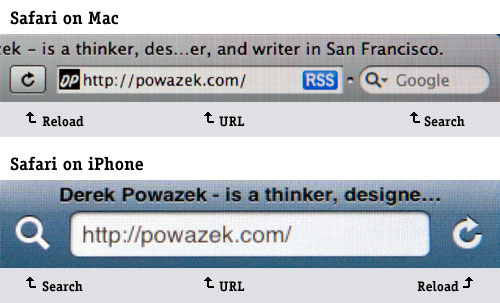
On the iPhone, the web browser is called Safari, just like on the Mac. This sameness is reinforced by the visual design of both applications. But in the new iPhone software, when they added a search icon, they did it on the left, instead of the right, which puts it out of sync with its desktop cousin.
safarinconsistency1.jpg

I know it sounds like a small difference, but small differences add up. Now, when I think I want to search the web, instead of instinctively going for the right side of the screen (like on the Mac), I have to go for the left. Apple has added a layer of decision-making, and any interface designer will tell you, these little additions add up.

Everything is so well thought-out on the iPhone, and the design of the iPhone OS and the Mac OS X is so harmonious, I have to assume there was some reason they did this, but for the life of me I can’t figure out what it is.

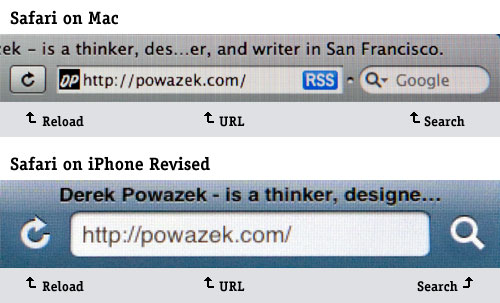
To be clear, this is how I think it should be. Although now, the change would be so disorienting, I can’t see it happening.
safarinconsistency-fixed.jpg

Here’s another one. When I think, I want to change my music on my Mac, I click the thing in the doc that says “iTunes”. But on the iPhone, when I click “iTunes” I get the iTunes wifi music store. On the iPhone, I have to tap the thing that says “iPod” to get to music. Confusing. It’s like having to click the “Mailbox” link on my mailbox in order to get mail. (Fortunately the 1.1.3 update finally allowed me to move iTunes to a secondary home screen so I could stop looking at it.)

As our computing experience breaks free from the bounds of the desktop computer and moves into everyday devices, consistent placement of major interface tasks is going to become very important. It’s a testament to Apple that this particular inconsistency stands out as a rarity in an otherwise perfect harmony of interaction deliciousness.

(BTW, the title of this post is a reference to Steve Krug’s required-reading book for web interface designers, Don’t Make Me Think.)

17 Comments

Couldn’t agree more. Since I use the browser so much on this phone, if does matter.

Reminds me of microsoft moving the refresh button in IE7, breaking almost a decade of muscle memory. What UI guru advised that??!!!

Robert on 23 January 2008 @ 6pm

Plus, although I know it isn’t necessarily intentional, the direction of the reload arrow has the suggestion of pointing at the object being reloaded. Placed on the opposite side it loses that context.

Even beyond Safari, search widgets in top right hand corners are practically defacto interface elements.

Maybe there is a competing mobile device input standard?

Davin on 23 January 2008 @ 7pm

Even worse, if you put Mobile Safari in landscape mode and click the search button on the left of the URL field, the search field appears on the right of the URL field (where it’s been since before 1.1.3).

Ben Artin on 23 January 2008 @ 7pm

Agreed! Consistency is next to godliness, or is that cleanliness? Should be consistency.

Ryan on 23 January 2008 @ 7pm

I would guess that search was placed at the top-left because it’s a high-priority use case.

In the previous revision of the iPhone software, the bookmark button was at the top left, to activate the straight-to-google search mode you had to tap the URL bar, then tap the search bar which appeared beneath it.

Bookmarking, while nice, is not a primary use of a mobile web-searching device. This is why it was moved to the bottom, with the other navigational tools (because it’s navigational)

Putting the search icon at the upper right cuts the number of taps to search in half - and considering that you will only reload a page once you’ve found it it makes sense that reloading is placed in a tertiary position behind the URL field. (reloading is sort of a weird browser artifact anyway)

Mobile Safari is mobile Safari, so the placement of buttons reflects the expected usage on a different type of platform.

Desktop Safari places it’s buttons and fields in the same place that every other browser sense Netscape 2.0 has because users are already familiar with that arrangement — a drastic change would make the tool more difficult to learn to use.

Just because they’re both named “Safari” doesn’t mean they are the same thing. Besides, many users of mobile Safari are Windows users and have no idea what you’re going on about.

Michael Barrett on 23 January 2008 @ 7pm

Conspiracy theory: Apple is getting revenue from search referrals and are counting on people erroneously sending their urls to a search engine. Actually that is my theory for why all browsers are making it increasingly easy to mistake the search bar for the address bar….

AndyF on 23 January 2008 @ 10pm

The naming issue has become pretty convoluted. If you want music on an iPod touch you go to “Music” while on an iPhone you look for iPod. If anyone actually had a ROKR they’d presumably go to iTunes. Which is, as you say, where an iPod touch/iPhone user goes to buy music.
(Becoming yet more anal) another way to look at it is “What is iTunes?”- is it a store, a jukebox or a mobile music app? Is iPod an application or a device? And while we’re at it, what’s OS X? It’s the Mac OS unless it’s the iPhone OS which is exactly the same as the iPod touch OS except the iPod touch OS isn’t OS X.

mister browne on 23 January 2008 @ 11pm

I can only assume they did it because most users are right handed, and presumably reloading is used more than searching.

But that’s not true - so this fix would be a good one.

Wolf on 24 January 2008 @ 12am

In Apple’s semi-defense, the stop/reload button has always been on the right, and I’ve found this a good place for it for those times when I need to quickly stop the browser from going to an accidentally-clicked link and wasting lots of time back-navigating and reloading. It’s also a good place for it because most people are right-handed, and presumably use their right fingers with their iPhones more than their left.

Putting the search button to the left of the URL bar doesn’t make a lot of sense, as has been pointed out, but the big problem with it is that it’s harder to tap because many of us use our left hand to hold the phone and our right to browse. However, I find it superfluous anyway, because the search field is only a couple taps behind the URL, both of which I can easily access with my right thumb.

So, to sum up: keep the stop/reload button where it is, and just get rid of the search button altogether.

Arden on 24 January 2008 @ 1am

In the previous revision of the iPhone software, the bookmark button was at the top left, to activate the straight-to-google search mode you had to tap the URL bar, then tap the search bar which appeared beneath it.

Bookmarking, while nice, is not a primary use of a mobile web-searching device. This is why it was moved to the bottom, with the other navigational tools (because it’s navigational)

Yet this move has bugged me since it happened. It clutters up the navigation bar at the bottom, which took some getting used to for me. Maybe my fingers are too chubby. Wait, I know they are :-)

I liked the previous method of invoking the search field. The joining of the search field and the address bar worked for me conceptually (both going somewhere), and was convenient.

Mark on 24 January 2008 @ 1am

I didn’t even notice that icon. I always just hit the URL bar (BIG TARGET) and it gives me both options.

mj on 24 January 2008 @ 3am

There is no need for the searchbar. The same functionality is achieved by clicking ( or touching, I suppose) within the url field.

So get rid of it :-)

eoin on 24 January 2008 @ 6am

Agreed, and the iPod/iTunes thing is particularly annoying. I don’t know why they just merge the two.

Beerzie Boy on 24 January 2008 @ 6am

I think the reason becomes clearer if you are right handed and use the iPhone/Touch one handed. It is possible to browse the web one handed, however if the reload button were on the left it would be difficult to reach it with your thumb. In the current setup you can, plus you can simply tap the address bar to get to the search field instead of tapping the spotlight icon.

Craigb6 on 24 January 2008 @ 6am

> Apple is getting revenue from search referrals and are counting on people erroneously sending their urls to a search engine. Actually that is my theory for why all browsers are making it increasingly easy to mistake the search bar for the address bar….

Interesting idea. My parents never type anything in the address bar except “google”, even though there’s a Google search field in their browser. What they’d make of Mobile Safari I don’t know.

pauldwaite on 24 January 2008 @ 7am

you could also customize the mac version of the safari toolbar to match the iphone one if you wanted…

Jay on 24 January 2008 @ 10am

Good catch.

Me, I’m peeved about the inconsistent placement of “Done” and compose buttons in different iPhone apps.

Ben Rosengart on 24 January 2008 @ 11am

Comments for this post are now closed.